NordVPN offers a good balance of speed, security, and price, making it a good option for first-time VPN users.
In this guide, we'll walk you through the process of signing up for NordVPN and getting started, with screenshots for each step.
The entire process only takes a few minutes, so you can follow the steps below to get started.
How to Sign Up for NordVPN: Step-by-Step Registration
Step 1: Visit the NordVPN Official Website
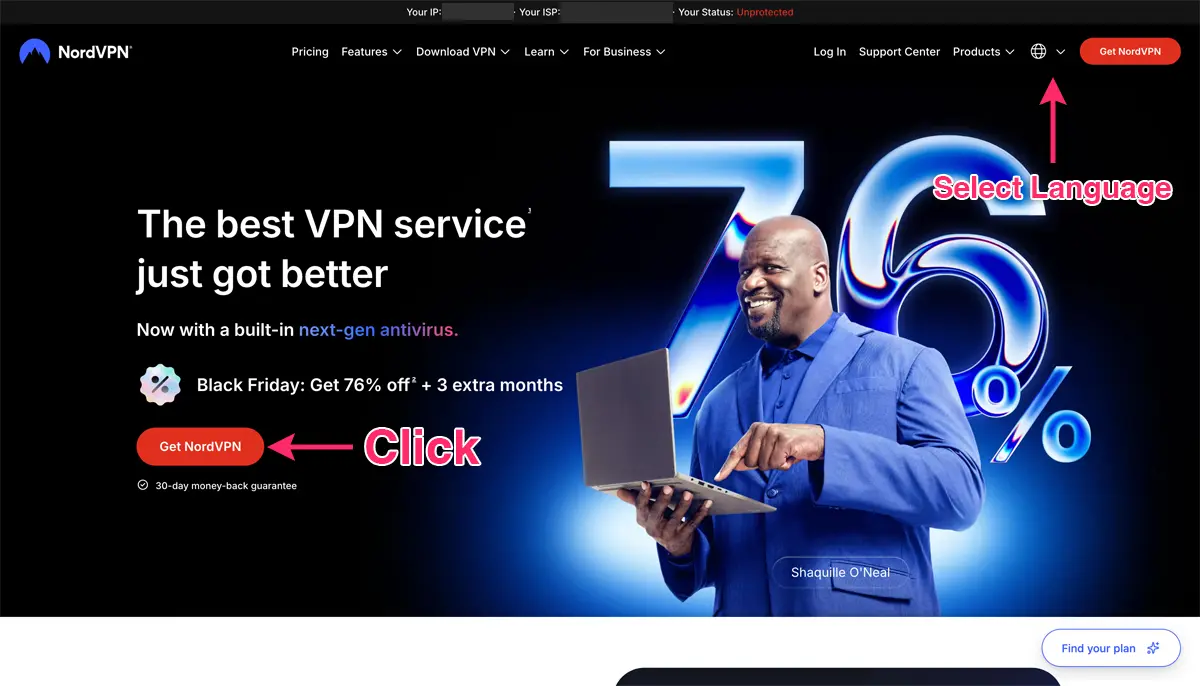
Go to the NordVPN Official Website and click “Get NordVPN.”
You can change the website language from the menu in the top-right corner of the page.
Step 2: Choose a Plan and Subscription Length
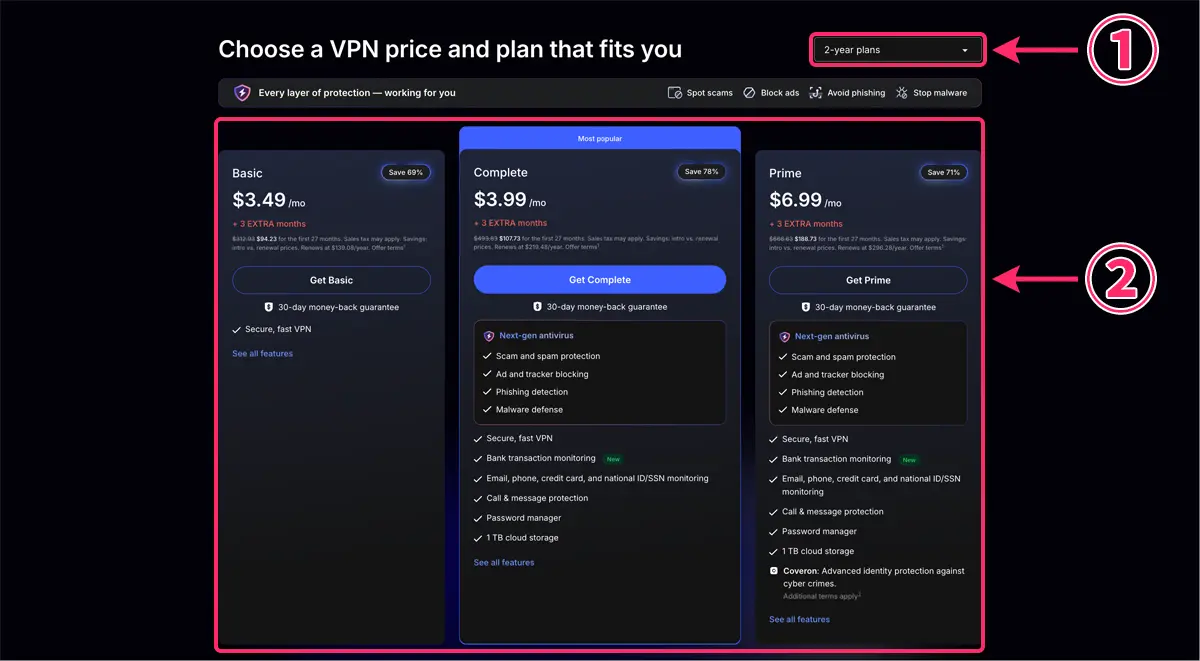
Follow these steps:
- Choose a subscription length, such as 2 years, 1 year, or 1 month.
- Choose the plan that best fits your needs and click the sign-up button.
NordVPN lets you choose both your subscription length and plan based on your needs.
NordVPN Pricing
| Plan | 2-year plan | 1-year plan | 1-month plan |
| Basic | $3.49/month | $4.99/month | $14.99/month |
| Complete | $3.99/month | $5.99/month | $19.99/month |
| Prime | $6.99/month | $8.99/month | $29.99/month |
In general, longer NordVPN subscriptions offer better value than paying month to month.
The 2-year plan typically offers the biggest discount, making it a good choice if you plan to use NordVPN long term.
Choose a subscription length based on how long you expect to use the service.
NordVPN also offers a 30-day money-back guarantee on new subscriptions, giving you time to try the service and decide whether it's right for you.
Which NordVPN Plan Should You Choose?
| Plan | Simultaneous connections | Features | Best for |
| Basic | Up to 10 devices | VPN | Users who mainly need a VPN |
| Complete | Up to 10 devices | VPN Security tools |
Users who want additional security features |
| Prime | Up to 10 devices | VPN Security tools Identity protection |
Users who want more comprehensive security and identity protection |
NordVPN currently offers three main plans: Basic, Complete, and Prime.
All three plans include NordVPN's core VPN service and allow you to connect up to 10 devices at the same time.
The main differences between the plans are the additional security features and services included with each one.
Here's a simple way to choose the right NordVPN plan:
- Basic: Best if you mainly need a VPN. If you're not sure which plan to choose and only need the core VPN features, Basic is a good place to start.
- Complete: Best for users who want a VPN with additional security features, such as a password manager and cloud storage.
- Prime: Best if you want the widest range of bundled security and identity protection features. Some Prime features may vary by country.
NordVPN's 30-day money-back guarantee also gives new subscribers time to try the service and decide whether it's the right fit.
Additional Nord Security Tools
- NordPass: A password manager that helps you securely store and manage your passwords and generate strong passwords.
- NordLocker: 1 TB of secure cloud storage with end-to-end encryption to help protect your files.
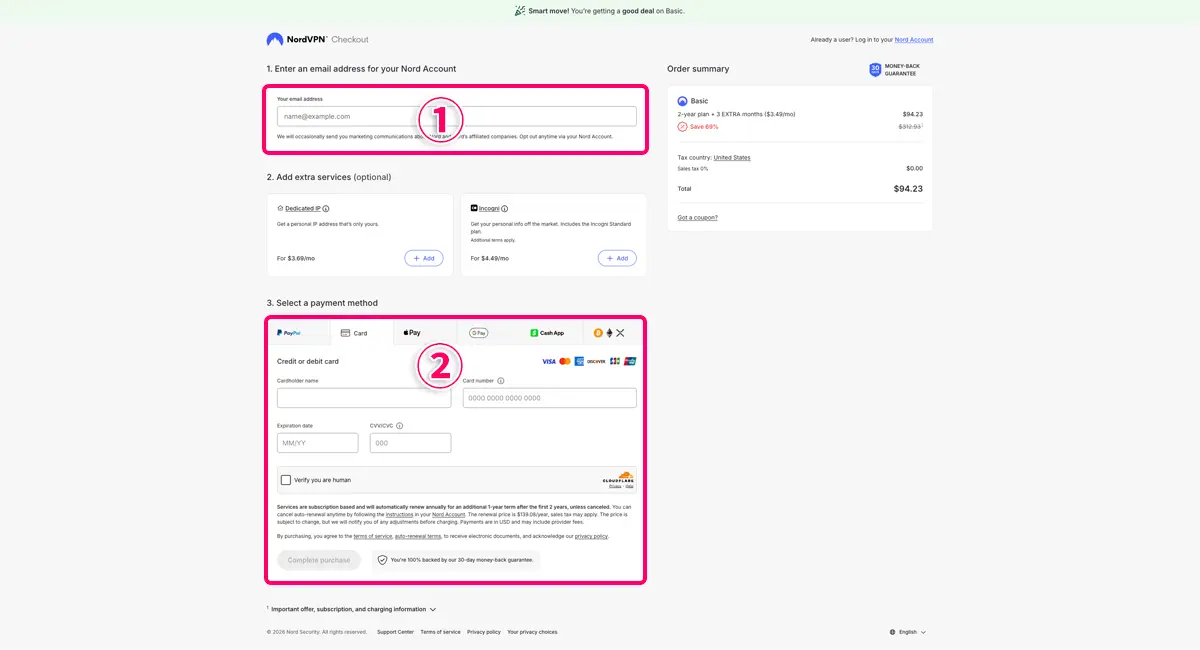
On the checkout page:
- Enter your email address.
- Choose a payment method and click “Complete purchase.”
NordVPN Payment Methods
NordVPN supports several payment methods, including:
- PayPal
- Credit and debit cards
- Apple Pay
- Google Pay
- Cash App
- Cryptocurrencies, such as Bitcoin and Ethereum
Available payment methods may vary depending on your country or region.
If you prefer to pay with cryptocurrency, NordVPN also accepts options such as Bitcoin.
Step 3: Set Your NordVPN Password
Finally, follow the on-screen instructions to set a password for your Nord Account.
Once that's done, your NordVPN sign-up is complete.
If you're ready to sign up for NordVPN, visit the NordVPN Official Website and follow the steps in this guide.
How to Set Up and Use NordVPN
Once you've signed up, the next step is to download and install the NordVPN app on the device you want to use.
We've created separate step-by-step guides for Windows, Mac, Android, iPhone, and iPad.
NordVPN Setup Guides
- How to Set Up NordVPN on Windows | Step-by-Step Guide
- How to Set Up NordVPN on Mac | Step-by-Step Guide
- How to Set Up NordVPN on Android | Step-by-Step Guide
- How to Set Up NordVPN on iPhone and iPad | Step-by-Step Guide
More About NordVPN
